

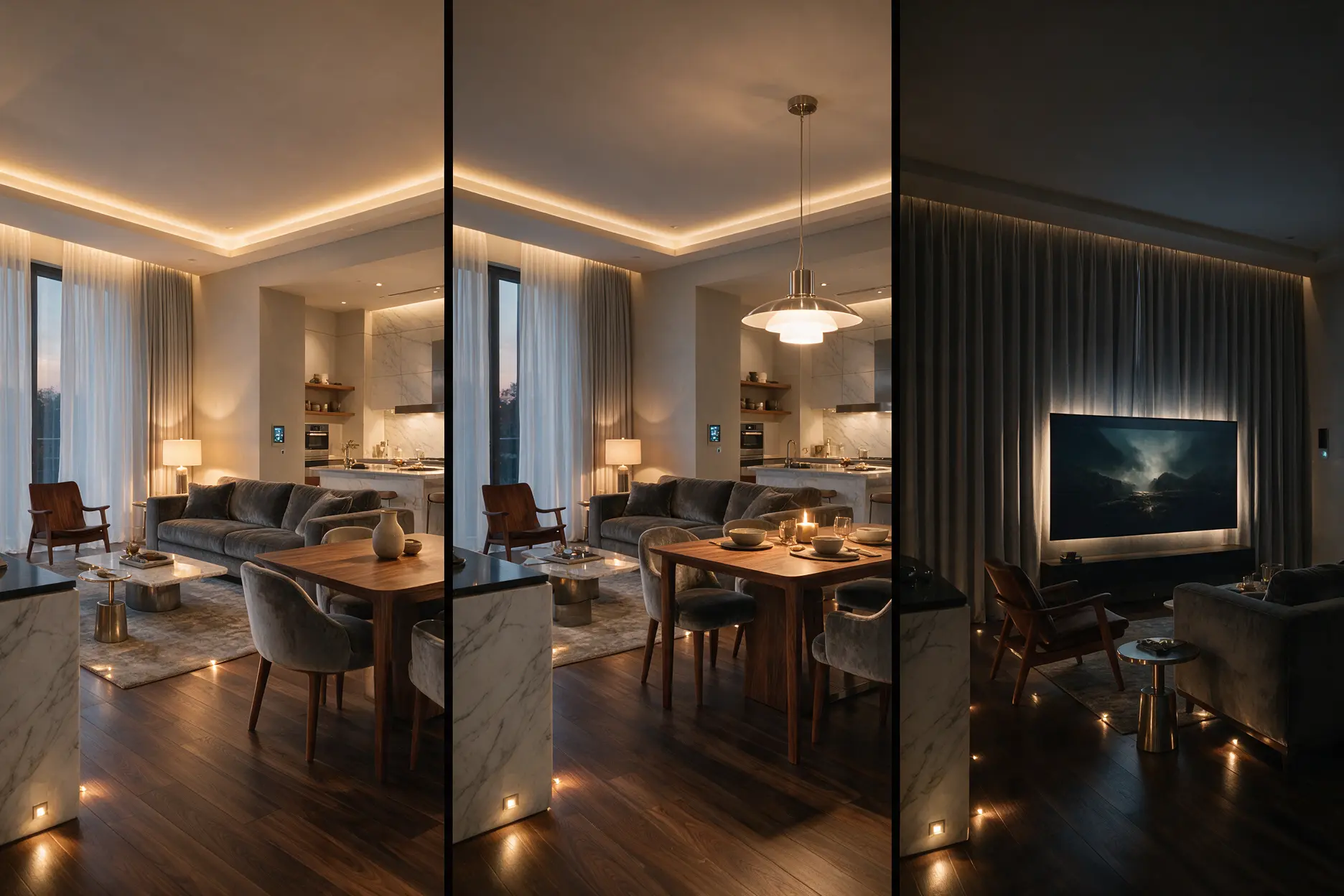
A lighting scene is a saved combination of light levels, colour temperatures and fittings that recalls with one touch, such as “Welcome”, “Dinner”, “Movie” or “Good Night”. In luxury homes, scenes are designed room by room, triggered by keypads, apps, schedules or sensors, and often linked with curtains and AV. KNX or DALI runs them most reliably.
Picture coming home on a winter evening. The door unlocks, the entrance glows softly, the living room cove fades up to 60%, and the curtains close. You haven’t touched a switch.
Later, one button dims everything for a film. Another, by the bed, turns off every light in the house except a faint path to the kitchen.
That’s what well-designed scenes do. They turn dozens of lights into a handful of moments. This guide explains how to design them, automate them and avoid the mistakes that make smart homes frustrating.
Who is this guide for?
- Villa and penthouse owners planning premium lighting control
- Homeowners building new who want automation that feels effortless
- Architects and interior designers planning lighting with clients
- Anyone with a “smart home” that still feels complicated to use
What is a lighting scene?
A lighting scene is a pre-set combination of brightness, colour temperature and selected lights, recalled with a single command.
Instead of switching six circuits one by one, you press “Dinner” and the pendant over the table rises to 80%, the cove softens to 40%, the downlights dim and the accent light on the art stays on. Scenes work best when the home already has layered lighting, because each layer can be adjusted separately.
Which scenes should a luxury home have?
Most luxury homes need eight to ten well-designed scenes, not dozens.
| Scene | When it’s used | What it typically does |
|---|---|---|
| Welcome | Arriving home | Entrance, corridor and living room fade up softly |
| Morning | Waking up | Bright, cooler light in kitchen and dressing areas |
| Day | Working hours | Balanced light that supports daylight |
| Evening | After sunset | Warm cove and lamps on, downlights dimmed |
| Dinner | Mealtimes | Pendant over table up, surroundings softer |
| Movie | Watching films | Most lights off, low step and back lighting |
| Party | Hosting guests | Warm, lively levels, accent lights on, outdoor on |
| Reading | Quiet time | Focused task light, soft background |
| Night Path | After midnight | Very low toe-kick or step lights to kitchen and bathroom |
| Good Night / Away | Bedtime or leaving | All lights off, selected security lights on |
At Brightmatic, we usually start with the Welcome, Evening, Movie and Good Night scenes, because they’re the four families end up using every single day.
How do you design a lighting scene?
Good scenes are designed around a moment, not around fixtures.
1. Start with the activity. Ask what the room is for at that moment: eating, relaxing, hosting, watching. Light the activity first.
2. Set levels, not just on and off. A great Evening scene might be cove 60%, lamps 40%, downlights 20%. Dimming is what creates mood.
3. Use colour temperature. With tunable white, mornings can be fresher and evenings warmer, all within the same scene structure.
4. Add fade times. Lights that glide up over two or three seconds feel luxurious. Lights that snap on feel mechanical.
5. Name scenes simply. “Dinner” is better than “Scene 3”. Labels on keypads should match what people actually say.
How are scenes triggered?
Scenes can be triggered by keypads, apps, voice, schedules or sensors, and the best homes combine several.
| Trigger | Best for |
|---|---|
| Wall keypad | Daily use; the most reliable and intuitive |
| Mobile app | Control from anywhere, holiday mode |
| Voice | Hands-free convenience |
| Schedule or astronomical timer | Evening scenes that start at sunset |
| Sensors | Night path, corridors and bathrooms. See our lighting sensors guide |
| Door or security events | Welcome scene on unlock, Away scene when the alarm is set |
Keypads remain the heart of a luxury system. Designer keypads from brands like Core and ABB combine glass or metal finishes with clearly labelled scene buttons.
Can scenes control more than lighting?
Yes. In a well-integrated home, one scene can adjust lights, curtains, AV and climate together.
A Movie scene can dim the lights, close the motorised curtains and switch on the projector. A Good Night scene can switch off lights, lower blinds, set the AC and arm security. This is where KNX shines, because every system speaks the same language. The KNX Association maintains the open standard used by many manufacturers.
Which system is best for running scenes?
Wired KNX, often combined with DALI, is the most reliable choice for luxury homes, while wireless systems suit smaller apartments and retrofits.
KNX handles scenes, keypads and integration across the whole home. DALI adds precise dimming of individual fixtures. Our DALI vs 0-10V guide explains the dimming side.
Scene design and programming are usually included in the lighting control system cost. Indicatively, wireless systems for apartments start around Rs 50,000, while full KNX systems for villas range from about Rs 8 to 20 lakh. See our lighting control system cost guide for details.
Want your scenes planned room by room? Share your floor plan →
Are lighting scenes worth it?
- Is it complicated? The opposite. Good scenes replace a wall of switches with a few buttons everyone understands.
- Is it expensive? Scenes come with any proper control system. The cost is in the system, not the scenes.
- What can go wrong? Too many scenes, unlabelled buttons and scenes nobody was consulted on.
What mistakes should you avoid?
- Creating 20 scenes when eight will do
- Using keypads with unlabelled or identical buttons
- Designing scenes without asking how the family lives
- Skipping fade times, so lights snap harshly
- Forgetting a Night Path scene for after midnight
- Not adjusting scenes after the first few weeks of living in the home
A common myth: smart lighting is about controlling lights from your phone. In reality, the best scenes are used from a wall keypad without anyone thinking about it.
Expert recommendation from Brightmatic
For luxury homes, we recommend eight to ten clearly named scenes, two-to-three-second fade times, tunable white in living and bedrooms, labelled designer keypads at every entry point, and integration with curtains and AV through KNX. Review the scenes after a month of living in the home and fine-tune them.
Brightmatic designs and programs lighting control and scenes for villas and premium homes.
Design your lighting scenes with Brightmatic
Brightmatic designs, installs and programs smart lighting scenes for villas, penthouses and premium apartments in Noida, Delhi NCR & across India.
FAQ's
What is a smart lighting scene?
A pre-set combination of light levels and colour temperatures, such as “Dinner” or “Movie”, recalled with a single button, app tap or schedule.How many lighting scenes does a home need?
Most luxury homes work best with eight to ten scenes, such as Welcome, Evening, Dinner, Movie, Night Path and Good Night.Can lighting scenes run automatically?
Yes. Scenes can follow schedules, sunset times, sensors, or events like unlocking the front door.Can one scene control curtains and AV too?
Yes. With KNX integration, one scene can adjust lights, motorised curtains, AV and climate together.Do I need KNX for lighting scenes?
Not always. Wireless systems can run basic scenes, but KNX is more reliable and better for whole-home integration in larger homes.Can scenes be changed later?
Yes. In KNX and DALI systems, scenes are reprogrammed in software without rewiring.Still planning your scenes? Talk to our lighting control expert. We’ll design them around your routine, free.
Comments
No Comments