

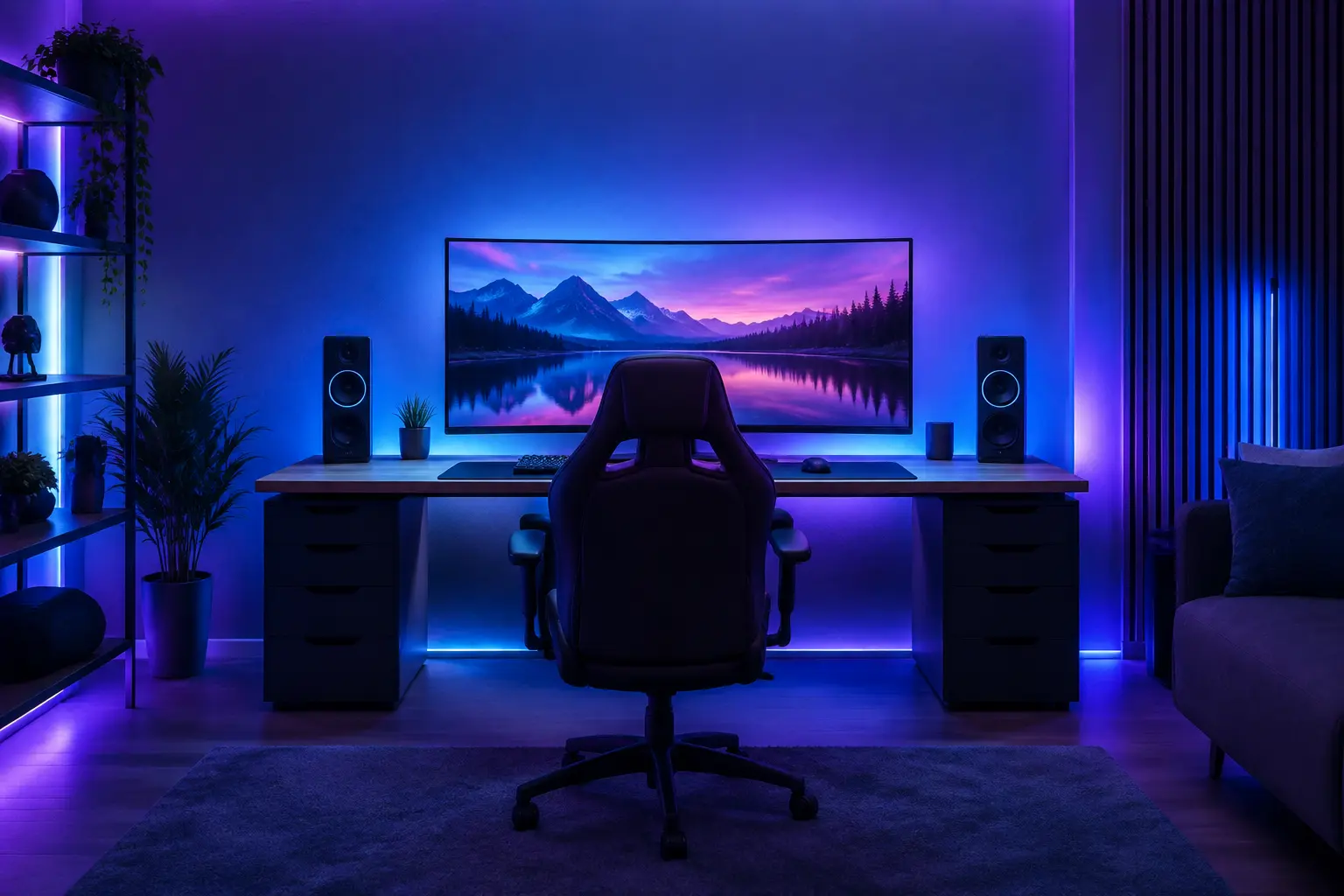
A great gaming room comes down to three things done well: the right display, immersive audio, and the right lighting — all built around comfort and performance. For the display, gamers need low input lag and a high refresh rate (120Hz+), whether that's a gaming TV, monitor, or a low-latency projector for a big-screen setup. For audio, immersive surround sound or a quality headset pulls you into the game and gives a competitive edge through directional cues. For lighting, bias and ambient lighting (often colour-changing) reduce eye strain and heighten immersion, while glare control keeps the screen clear. Add comfortable seating and tidy cable management, and you have a room built for serious play. This guide covers how to set up each part.
A gaming room isn't just a TV and a console in a corner — done right, it's an immersive environment tuned for performance and comfort. Here's how to build one.
Who Is This Guide For?
Gamers and enthusiasts setting up a dedicated gaming room or gaming corner in a home or apartment in Noida, Greater Noida, Gurgaon, or Delhi NCR. Parents building a gaming space for the family. And anyone wanting a properly designed gaming setup — display, sound, and lighting done well — rather than a basic corner.
What Makes a Gaming Room Different
A gaming room has different priorities from a home cinema. A home cinema is optimised for watching films — big screen, cinematic surround, dark room. A gaming room is optimised for interactive performance: fast, responsive visuals, precise directional audio, comfort for long sessions, and lighting that reduces eye strain and adds immersion.
The two overlap (both want great picture and sound), but gaming adds specific needs — low latency, high refresh rates, ergonomic comfort, and often colourful ambient lighting — that shape how you set the room up. Get these right and the room performs; ignore them and even expensive gear underdelivers.
1. The Display
The display is the heart of a gaming room, and gaming has specific requirements:
Low input lag. The single most important gaming spec — the delay between your controller/mouse input and the screen response. Low input lag is critical for responsive, competitive gaming. Look for displays with a dedicated "Game Mode."
High refresh rate. A 120Hz (or higher) refresh rate makes motion smoother and gameplay more responsive than a standard 60Hz screen — a noticeable advantage, especially in fast games. Modern consoles and gaming PCs support 120Hz.
Resolution. 4K delivers sharp, detailed visuals; ensure the display and your console/PC support 4K at a high refresh rate if that's your goal.
Display type — TV, monitor, or projector:
- Gaming TV — great all-round for console gaming from a sofa; choose one with low lag, 120Hz, and HDMI 2.1.
- Gaming monitor — best for desk/PC gaming, with the fastest response times and refresh rates.
- Projector — for a big-screen, immersive experience; choose a low-latency gaming projector, as many projectors have too much lag for serious play. (See our projector vs TV guide.)
Match the display to how you game — desk PC, console on a sofa, or big-screen immersion.
2. The Audio
Sound is half the gaming experience — and in competitive games, a genuine advantage:
Immersive surround sound. A surround system pulls you into the game world and provides directional audio cues — hearing exactly where a sound comes from is a real competitive edge. This can be a full speaker setup or a quality soundbar with virtual surround.
Gaming headset. For solo or competitive play, a good headset delivers precise directional audio and clear comms, without disturbing others — often the practical choice.
In-room speakers. For a shared, immersive room, proper speakers (including in-ceiling or in-wall for a clean look) create an enveloping experience for group play and casual sessions.
Low audio latency. Just as with visuals, audio should be in sync — wireless setups should be low-latency so sound matches the action.
The right choice depends on whether you game solo (headset) or want a shared, room-filling experience (speakers/surround).
3. The Lighting
Lighting is where a gaming room becomes special — and it's often overlooked:
Bias lighting. A soft light behind the screen (bias lighting) reduces the harsh contrast between a bright screen and a dark room, easing eye strain during long sessions and improving perceived picture quality. A simple, high-impact upgrade.
Ambient & colour-changing lighting. Smart, colour-changing ambient lighting — strips, panels, or smart bulbs — sets the mood and heightens immersion. Many gamers sync lighting to the game or a chosen colour scheme for atmosphere.
Glare control. Position lights and screens to avoid glare and reflections on the display, which distract and cause eye strain. Avoid light sources directly facing or reflecting in the screen.
Dimmable & scene-based. Dimmable lighting lets you darken the room for immersive play and brighten it for breaks. Smart scenes — a "gaming" scene that dims the room and sets the ambient colour at a tap — make it effortless.
Eye comfort. Never game in a completely dark room with only screen light — it strains the eyes. Soft ambient light alongside the screen is easier on the eyes over long sessions.
Comfort & the Room Itself
The environment matters as much as the gear:
Seating. A comfortable, supportive gaming chair or sofa is essential for long sessions — ergonomics prevent fatigue and strain.
Cable management. Consoles, PCs, and peripherals create cable chaos. Tidy, managed cabling keeps the room clean and functional.
Ventilation & power. Gaming gear generates heat and needs reliable power; plan for both, including surge protection.
Acoustics (optional). For a dedicated room, some acoustic treatment improves sound and, if it's loud, some soundproofing keeps it from disturbing the rest of the home.
Bringing It Together — Integration
The best gaming rooms integrate everything for simple control. A single "gaming" scene can dim the lights, set the ambient colour, switch the display to game mode, and power up the audio — one tap, ready to play. Integrating the display, audio, and lighting into a coordinated setup (via smart control) turns a collection of gear into a genuine gaming environment. This is the same AV integration thinking behind a home cinema, tuned for gaming.
Expert Recommendation from Brightmatic
For the gaming rooms we help set up across Delhi NCR, our guidance is: prioritise low latency and eye comfort first, then build immersion with audio and lighting.
The insight worth passing on: gamers often pour the entire budget into the display and the PC, then game in a dark room with a bright screen and no ambient light — and wonder why their eyes ache after an hour and the setup feels flat. The room around the screen matters enormously. A little bias lighting behind the display and soft, dimmable ambient light transform both eye comfort and immersion for a fraction of the cost of a GPU upgrade. And integrating it all — so one tap sets the whole room for play — is what turns a good setup into a great one. Spend on the performance essentials, yes, but don't neglect the lighting and the environment; that's where a gaming room goes from functional to unforgettable.
That's the thinking behind our AV and lighting approach for gaming spaces — performance and immersion together, Crafting Brighter Lives.
Building a Gaming Room?
A great gaming room is more than a screen and a console — it's a display tuned for performance, immersive audio, and lighting that protects your eyes and pulls you into the game, all working together. Get the essentials right and integrate them, and you have a space built for serious play.
Planning a gaming room? Get a free consultation.
Setting up a gaming or entertainment room in Noida or Delhi NCR? Contact Brightmatic for a personalised AV and lighting consultation.
FAQ's
What do I need for a gaming room setup?
A gaming room needs three core elements done well: a display with low input lag and a high refresh rate (120Hz+), immersive audio (surround speakers or a quality headset), and the right lighting (bias lighting behind the screen plus dimmable ambient lighting). Add comfortable ergonomic seating, tidy cable management, and reliable power. Integrating these into one coordinated setup completes a proper gaming room.What is the best display for a gaming room?
The best display has low input lag and a high refresh rate (120Hz or more), ideally at 4K with HDMI 2.1. A gaming TV suits console gaming from a sofa, a gaming monitor suits desk/PC gaming with the fastest response, and a low-latency gaming projector suits big-screen immersion. Match the display to how and where you game, and always enable Game Mode.Why is lighting important in a gaming room?
Lighting reduces eye strain and heightens immersion. Bias lighting behind the screen eases the harsh contrast between a bright display and a dark room, reducing fatigue over long sessions. Ambient, colour-changing lighting sets the mood and immersion, while glare control keeps the screen clear. Never game in complete darkness with only screen light — soft ambient light is far easier on the eyes.Do I need surround sound for gaming?
Surround sound isn't essential but adds real value — it immerses you in the game and provides directional audio cues that give a competitive edge, since hearing where a sound comes from matters in many games. A full surround system suits a shared room; a quality gaming headset delivers precise directional audio for solo or competitive play without disturbing others.What lighting is best for a gaming room?
The best gaming room lighting combines bias lighting behind the screen (to reduce eye strain), dimmable colour-changing ambient lighting (for mood and immersion), and careful glare control so no light reflects on the display. Smart, scene-based lighting — a "gaming" scene that dims the room and sets the ambient colour at a tap — makes it effortless and adds to the experience.
Comments
No Comments