

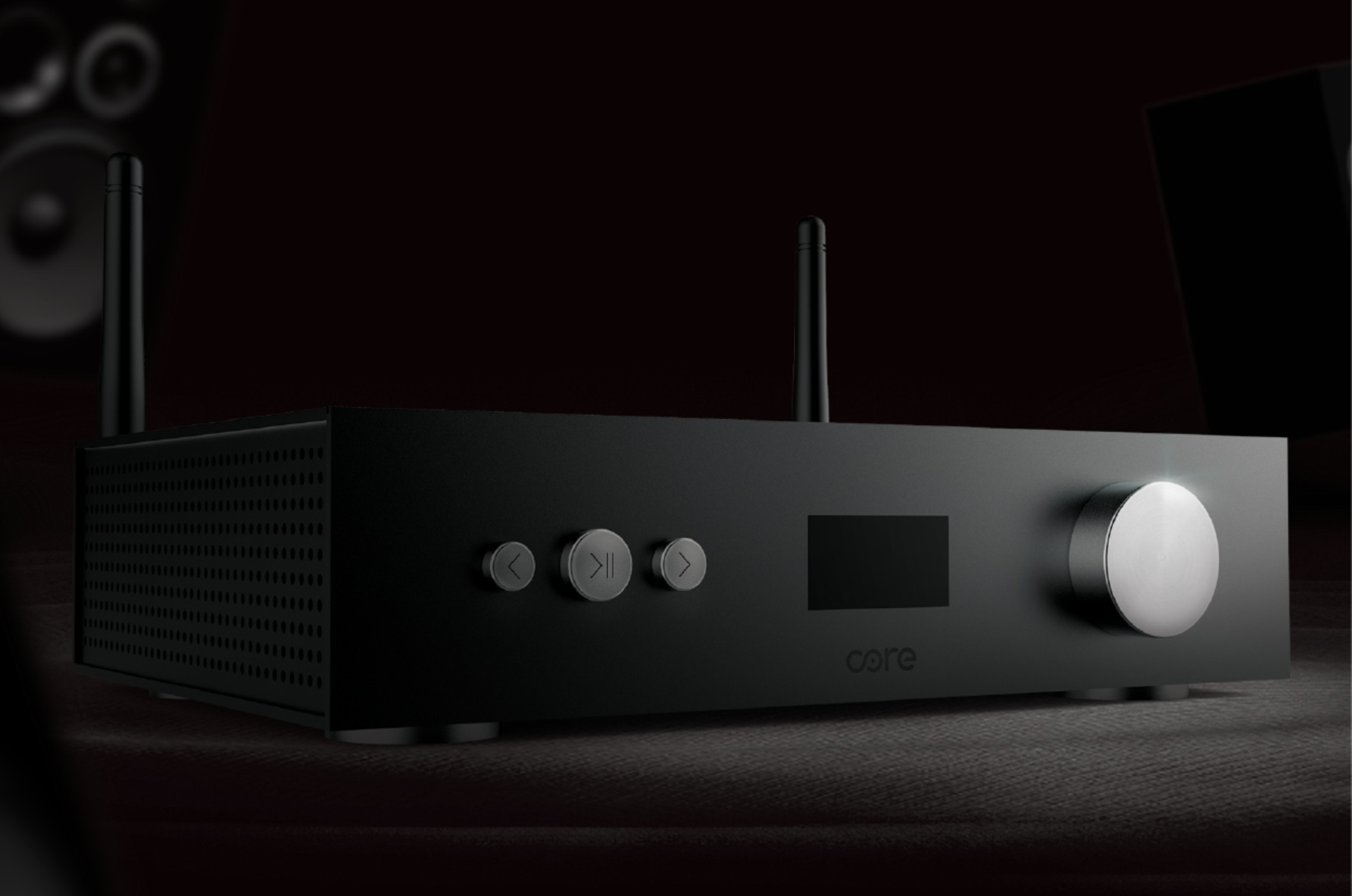
The Core Audio Streamer is a KNX-integrated, network-based multi-room audio system that streams Spotify, Tidal Connect, and Internet Radio across up to 12 independent audio zones simultaneously — each playing different content at different volumes, all controlled from a single CoreOS interface, a wall-mounted touch panel, or a voice command. It is the missing audio layer in any complete Core Smart Home installation.
Why Most Indian Homes Have No Real Audio System
Walk through a premium Indian villa in 2026. The lighting is designed. The AC is smart. The security cameras are AI-powered. Then you ask: where is the audio?
Typically, the answer is a Bluetooth speaker in the living room and phone speakers everywhere else.
This is the single most overlooked element of luxury home design in India. A home that cost ₹3 crore to build plays music through a ₹3,000 portable speaker.
The reason is simple — most Indian homeowners and their interior designers plan lighting, climate, and security during the design phase. Audio is treated as a furniture purchase made after possession. By that point, cables cannot be run inside walls, speakers cannot be recessed into ceilings, and the architecture of a proper whole-home audio system becomes prohibitively expensive to retrofit.
The Core Audio Streamer changes the conversation about when and how audio should be planned — and why it belongs in the same category as lighting and automation, not consumer electronics.
What is the Core Audio Streamer?
The Core Audio Streamer is a rack-mountable network audio server designed specifically to integrate with Core Smart Home's KNX ecosystem. Unlike standalone streaming devices — Sonos, WiiM, Bluesound — the Core Audio Streamer is not designed to operate independently. It is designed to operate as a fully integrated component of your Core KNX smart home, where audio zones are controlled by the same touch panels, push buttons, and scenes that control your lighting, climate, and security.
The three defining characteristics:
Connected — Streams Spotify Connect, Tidal Connect, and Internet Radio directly over your home network. No Bluetooth bottlenecks, no compression, no range limitations. The music source lives on the internet and arrives at your speakers over your wired or Wi-Fi home network at full streaming quality.
Integrated — All zone controls are integrated with KNX user interfaces via CoreOS Home Controller Touch Panels. The same panel that dims your living room lights and sets your AC to 24°C also controls which zone is playing, what is playing, and at what volume.
Embedded — A single app interface on CoreOS Touch Panels and the Core Mobile App controls all audio zones simultaneously. No switching between apps — Spotify on one phone, Tidal on another, panel for volume — everything is in one place.
Core Audio Streamer — Key Specifications
| Specification | Detail |
|---|---|
| Maximum Audio Zones | Up to 12 independent zones |
| Streaming Services | Spotify Connect, Tidal Connect, Internet Radio |
| External Sources | Multiple digital and analog inputs |
| Control Interface | CoreOS Touch Panels + Core Mobile App |
| KNX Integration | Full — via CoreOS Home Controller |
| Zone Independence | Each zone plays different content simultaneously |
| Scene Integration | Audio triggers via KNX scenes |
| Connectivity | Ethernet (primary) + Wi-Fi |
| Control Protocol | CoreOS + KNX |
| App | iOS + Android (Core Mobile App) |
How Multi-Room Audio Actually WorksUnderstanding the architecture of a multi-room audio system removes the mystery and helps you make informed decisions about your installation. The Three Components1. Audio Source — Where the music comes from. In the Core system, sources are Spotify Connect, Tidal Connect, and Internet Radio — streaming from the internet directly to the Core Audio Streamer over your home network. You can also connect external sources — a TV audio output, a CD player, a turntable with a phono preamp — via analog and digital inputs. 2. Audio Distribution — The Core Audio Streamer receives the source audio and distributes it to up to 12 independent output channels. Each channel feeds a separate room or zone. The distribution happens inside the streamer — no separate matrix switcher or amplifier required at the distribution stage. 3. Zone Amplification and Speakers — Each zone's audio output connects to a power amplifier (separate or integrated), which drives the speakers installed in that room — in-ceiling speakers, in-wall speakers, bookshelf speakers, or outdoor weatherproof speakers. The KNX Control LayerWhat separates the Core Audio Streamer from any standalone multi-room system is the KNX control layer. The streamer integrates with your CoreOS Home Controller, which means:
|
12 Audio Zones — What This Means for Indian Homes
12 independent audio zones is significantly more than most Indian homes will ever need. For context, here is how a typical premium Indian villa would use the Core Audio Streamer's zone capacity:
| Zone | Room | Typical Use |
|---|---|---|
| Zone 1 | Master Bedroom | Morning news, sleep sounds, personal playlist |
| Zone 2 | Living Room | Background music during evenings and parties |
| Zone 3 | Kitchen | Podcast while cooking, upbeat music for energy |
| Zone 4 | Dining Room | Dinner background music, synchronized with lighting scene |
| Zone 5 | Home Office | Focus music, productivity playlists |
| Zone 6 | Guest Bedroom | Independent control for visiting family |
| Zone 7 | Children's Room | Age-appropriate content, independent of parents' zones |
| Zone 8 | Terrace / Balcony | Outdoor entertaining — weatherproof speakers |
| Zone 9 | Home Theatre | Pre-show background, overridden by AV system for main playback |
| Zone 10 | Gym / Workout Area | High-energy playlists on demand |
| Zone 11 | Pooja Room / Meditation | Devotional content, specific playlists |
| Zone 12 | Entrance / Lobby | Welcome music when guests arrive — scene triggered |
The power of 12 zones: Every family member has complete independence. Your children's room plays their music. The kitchen plays yours. The living room plays something completely different for guests. Nobody compromises.
Streaming Services — Spotify Connect vs Tidal Connect
The Core Audio Streamer supports both of the world's most important streaming protocols — Spotify Connect and Tidal Connect. Understanding the difference helps you choose the right service for your listening habits and audio equipment.
| Feature | Spotify Connect | Tidal Connect |
|---|---|---|
| Audio Quality | Up to 320kbps OGG Vorbis | Up to 24-bit/192kHz FLAC (HiFi) |
| Lossless Audio | No | Yes — Tidal HiFi plan |
| Music Library | 100+ million tracks | 100+ million tracks |
| Pricing (India) | ₹119/month (Individual) | ₹199/month (HiFi) |
| Control Method | Spotify app → Cast to Core | Tidal app → Connect to Core |
| Best For | Everyday listening, discovery | Audiophiles, critical listening |
| Offline Playback | Yes (on phone, not streamer) | Yes (on phone, not streamer) |
For most Indian households: Spotify Connect for daily background listening across most zones, Tidal Connect reserved for the dedicated listening room or home theatre where audio quality is critically important.
Internet Radio — 50,000+ Stations From Your Wall Panel
Internet Radio is one of the most underappreciated features of the Core Audio Streamer. Access to over 50,000 radio stations from across India and the world — classical, jazz, news, devotional, regional language stations — directly from your CoreOS touch panel or push button.
Practical applications for Indian homes:
Morning routine — An alarm scene activates at 6:30 AM, gradually increasing the kitchen speaker volume playing All India Radio news.
Pooja/Meditation — A dedicated scene activates devotional radio stations on the pooja room zone at specific times.
Regional content — Gujarati, Tamil, Malayalam, Bengali regional stations available for different family members' preferences simultaneously across different zones.
Background ambiance — Jazz, lounge, or classical stations provide consistently curated background music for dinner parties without requiring active playlist management.
Scene Integration — Where Audio Becomes Intelligent
The Core Audio Streamer's deepest value is revealed when audio is integrated into KNX scenes. This is where multi-room audio stops being a convenience and becomes a genuine lifestyle transformation.
| Scene | Audio Behaviour |
|---|---|
| Good Morning | Kitchen zone activates at 40% volume with your morning playlist. Bedroom zone fades out after 10 minutes. |
| Focus Mode | Home office zone plays lo-fi focus music at 50%. All other zones mute. |
| Dinner Party | Dining room zone activates jazz playlist at 45%. Living room background at 30%. Kitchen mutes. |
| Movie Night | All background audio zones mute. AV system takes over home theatre audio. |
| Relax Evening | Living room plays soft acoustic playlist at 35%. Master bedroom pre-queues sleep sounds for later. |
| Good Night | All zones fade out over 5 minutes. Bedroom zone switches to sleep sounds at 15% for 30 minutes, then mutes. |
| Party Mode | Living room, terrace, and entrance zones synchronize on the same high-energy playlist at 70%. |
| Away | All zones mute. Entrance zone activates at intervals to simulate occupancy. |
Each scene executes via a single KNX command — one tap on a push button, one tap on the CoreOS panel, or one voice command.
Follow-Me Audio — The Most Advanced Feature
The most sophisticated application of Core Audio Streamer integration with KNX is Follow-Me Audio — where music follows you from room to room automatically, without any manual zone switching.
How it works:
The presence sensors already installed in your Core KNX system — the proximity sensors in your Eclipse Room Controllers and Thermostatic Push Buttons — detect which rooms are occupied. When you move from the kitchen to the living room, the KNX system:
- Detects your departure from the kitchen (presence sensor → no motion)
- Detects your arrival in the living room (presence sensor → motion detected)
- Triggers a KNX command to fade kitchen audio to 0% over 10 seconds
- Triggers a KNX command to activate living room audio at your preferred volume
- The same playlist continues — no interruption, no manual action
In a recent Brightmatic installation at a 4BHK apartment in Sector 137, Noida — the client requested Follow-Me Audio as a specific feature requirement. After programming the Core KNX system with presence-linked audio scenes, the client's feedback at handover was: "I stopped noticing the music — it just follows me everywhere. That's when I realized it was working perfectly."
Speaker Options for Indian Homes
The Core Audio Streamer is speaker-agnostic — it works with any passive or active speaker system. For Indian homes, three primary speaker categories are relevant:
In-Ceiling Speakers (Recommended for New Construction)
The premium choice for Indian false-ceiling construction. Recessed flush into the ceiling, in-ceiling speakers are completely invisible — only a grille is visible, which can be painted to match the ceiling color.
Best for: Living rooms, bedrooms, home offices, corridors — any room where visual aesthetics are important.
Pre-wiring requirement: Speaker cable must be run during construction, before plastering.
In-Wall Speakers
Mounted flush into the wall surface, in-wall speakers project sound horizontally into the room — better imaging for music listening than overhead in-ceiling speakers.
Best for: Dedicated listening rooms, home offices where stereo imaging matters.
Outdoor Weatherproof Speakers
IP65-rated speakers designed for terraces, balconies, gardens, and pool areas. Must withstand Indian monsoon conditions, direct sun exposure, and temperature variation.
Pre-wiring requirement: Outdoor speaker cables require conduit protection when routed through walls and must be rated for outdoor use.
Multi-Room Audio vs Bluetooth Speakers — The Real Comparison
| Feature | Core Multi-Room Audio | Bluetooth Speaker |
|---|---|---|
| Audio Quality | Full streaming quality — no compression | Bluetooth compressed — audible quality loss |
| Range | Unlimited — whole home over network | 10 metres maximum |
| Zone Independence | 12 simultaneous independent zones | 1 device per zone minimum |
| Integration | Full KNX — scenes, presence, voice | None — standalone device |
| Visual impact | Zero — hidden in ceiling/wall | Physical device visible in every room |
| Battery/Power | Wired — always available | Charging required |
| Reliability | 99.9% — wired infrastructure | Dependent on Bluetooth pairing |
| Scalability | Up to 12 zones from single device | Each room needs separate device |
| Control | CoreOS panel + app + voice + KNX button | Phone only |
| Scene integration | Yes — part of KNX automation | No |
Planning Your Multi-Room Audio System — What to Do Before Construction
The most expensive mistake in multi-room audio is planning it after construction. Unlike lighting, where retrofitting LED strips is relatively straightforward, audio requires physical speaker cable runs inside finished walls and ceilings.
Pre-wiring checklist for Core Audio Streamer installations:
Speaker cable — Minimum 16 AWG (preferably 14 AWG for longer runs) oxygen-free copper. Run from each speaker position back to the central equipment rack location.
Speaker positions — Mark exact ceiling positions on the architect's drawing before false ceiling work begins. In-ceiling speakers require a 6-inch to 8-inch circular cutout — mark these precisely.
Equipment rack location — The Core Audio Streamer, amplifiers, and Core Home Controller typically sit in a dedicated AV rack. Allocate a lockable cabinet space in a utility room or storage area with adequate ventilation.
Ethernet to rack — Wired Ethernet connection to the equipment rack for Core Audio Streamer network connectivity — more reliable than Wi-Fi for continuous multi-zone streaming.
Conduit for future expansion — Run empty conduit pipes alongside speaker cables for all zones — allowing future cable additions without civil work.
Our audio-video integration team at Brightmatic provides complete pre-wiring specifications and coordinates with your architect and interior designer during the construction phase.
Budget Guide — Multi-Room Audio for Indian Homes
| System Scale | Zones | Budget Range | What Is Included |
|---|---|---|---|
| Starter | 2–3 zones | ₹1.5L – ₹3L | Core Audio Streamer, 3 pairs in-ceiling speakers, amplifier, basic cabling |
| Standard | 4–6 zones | ₹3L – ₹7L | Core Audio Streamer, 6 pairs in-ceiling speakers, zone amplifiers, full integration |
| Premium | 7–12 zones | ₹7L – ₹18L+ | Core Audio Streamer, premium in-ceiling speakers, dedicated rack, full KNX scene integration, outdoor zones |
FAQ's1. Can I use the Core Audio Streamer without the Core KNX smart home system? The Core Audio Streamer is designed as an integrated component of the Core Smart Home ecosystem — it is controlled through CoreOS running on Core Touch Panels and via the Core Mobile App. While it can technically stream audio as a standalone device, its full value — scene integration, KNX control from push buttons and touch panels, follow-me audio, and voice control — is only realized when installed as part of a complete Core KNX system. 2. Can different family members play different music in different rooms simultaneously? Yes — this is the fundamental capability of multi-room audio. With the Core Audio Streamer supporting up to 12 independent zones, each zone can play a completely different source at a completely different volume. Your living room plays jazz for guests, your children's room plays their playlist, the kitchen plays your podcast — all simultaneously and completely independently. 3. What happens to the audio if the internet goes down? Streaming services (Spotify, Tidal, Internet Radio) require an active internet connection to function. If your broadband goes down, streaming stops. However, any external sources connected via analog or digital inputs — such as a TV, CD player, or music server on your local network — continue to function normally as they do not require internet connectivity. 4. Is the Core Audio Streamer compatible with existing passive speakers I already own? Yes — provided your existing speakers are passive (require external amplification) and rated for the output power of the amplifier used in your Core installation. Bookshelf speakers, floor-standing speakers, and in-wall/in-ceiling passive speakers all work with the Core Audio Streamer through appropriate amplification. Our team assesses your existing speaker specifications before recommending the correct amplifier pairing. 5. How is audio quality affected when streaming across multiple zones? Each zone receives an independent audio stream — streaming quality is not divided or degraded when multiple zones are active simultaneously. Spotify streams at up to 320kbps per zone. Tidal streams at lossless FLAC quality per zone. The Core Audio Streamer maintains full quality per zone regardless of how many zones are active, provided your home network has sufficient bandwidth — which any standard broadband connection in India today comfortably provides. 6. Can Alexa or Google control the Core Audio Streamer by voice?
Yes — through the CoreOS platform running on the Core Eclipse Home Controller. Once configured, voice commands like "Alexa, play jazz in the living room" or "Hey Google, pause music in the kitchen" are executed through the CoreOS integration. Voice control applies to zone selection, source selection, volume, and play/pause functions across all connected zones. |
Comments
No Comments