

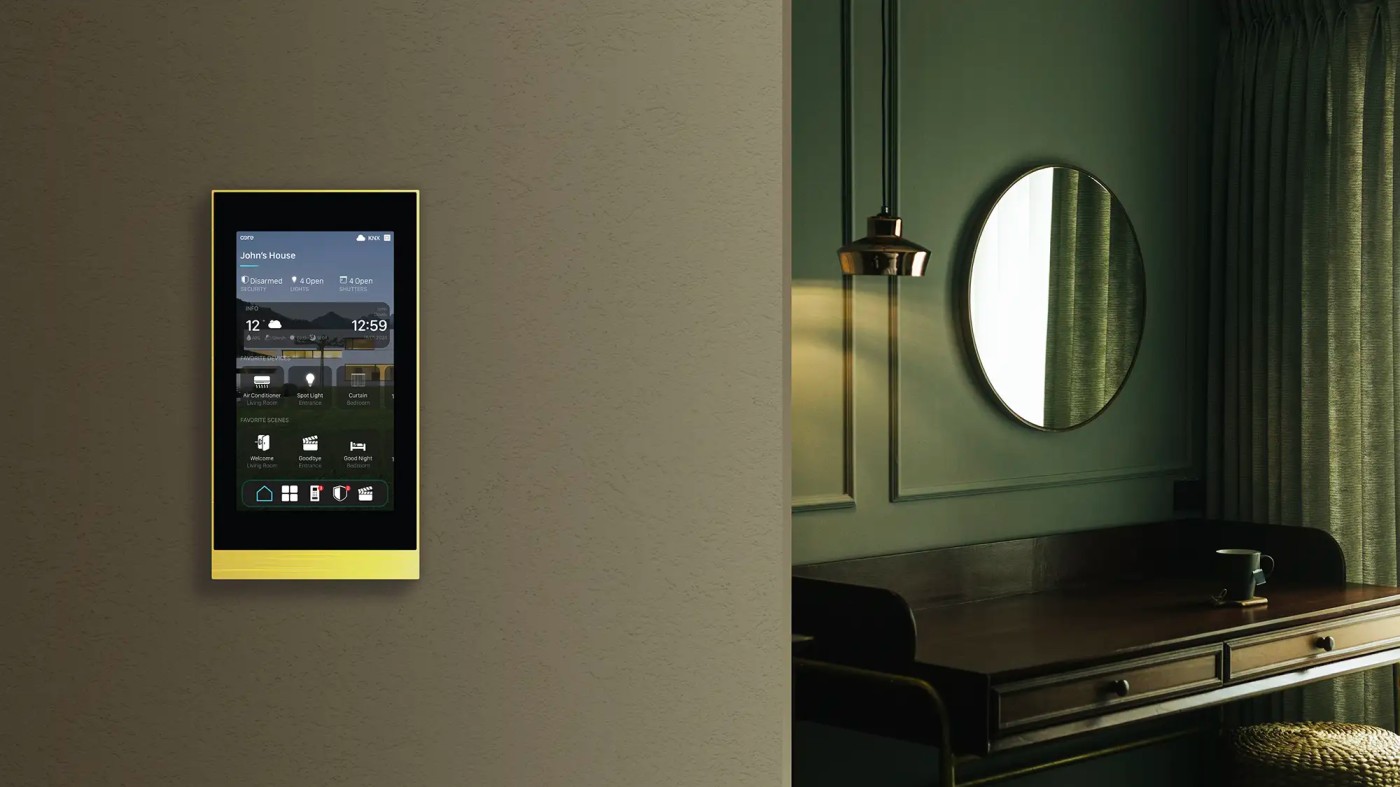
A Core Smart Home Touch Panel is a wall-mounted, KNX-certified control interface that replaces every switch, thermostat, and remote control in your home with a single, elegant touchscreen. Built on the CoreOS operating system with KNX, Z-Wave, Modbus, and SIP protocol support, Core touch panels allow you to control lighting, climate, audio, security, and blinds from one device — responding to a single tap, a voice command, or a scheduled automation.
Why Traditional Switches Are No Longer Enough
Walk into any premium Indian home built before 2020 and count the switches. A typical 3BHK apartment has between 40 and 60 individual switches distributed across every room. Each switch controls one function — one light, one fan, one socket. To create a "Movie Night" atmosphere in your living room, you need to physically operate 8 to 12 switches in the correct sequence.
This is the fundamental problem that Core Smart Home's touch panel solves.
A single Core Eclipse Touch Panel mounted in your living room replaces all 12 switches with one intuitive interface. One tap activates a "Movie Night" scene — lights dim to 10%, the projector screen descends, the air conditioning adjusts to 24°C, and the audio system switches to the correct input. Everything happens simultaneously, instantly, and without you leaving your seat.
In premium residential projects across Noida, Greater Noida, and Delhi NCR — where luxury villa and high-rise apartment interiors demand clean, uncluttered wall surfaces — the Core touch panel has become the defining element of professional smart home installations.
What is Core Smart Home?
Core Smart Home is a Turkish smart home and building automation company founded in 2013 in Izmir, Turkey. The company specializes in KNX-based home and building automation, and is an active member of the KNX Association — the global body that certifies smart home interoperability standards.
Core's product range includes:
- Eclipse Touch Panels — Wall-mounted KNX control interfaces (4", 5", 10")
- Eclipse Room Controllers — Compact room-level control panels
- Audio Streamers — Multi-room audio integration
- KNX Switches and Actuators — DALI dimming, on/off control
- Eclipse Thermostatic Push Button — Climate control integration
- CoreOS Platform — Proprietary operating system tying all devices together
Core products are installed across Europe, Middle East, and increasingly in premium Indian projects through certified partners like Brightmatic.
Core Touch Panel Product Range — Which Model Is Right for You?
Core offers two primary touch panel families for residential and commercial installations:
| Model | Display Size | Resolution | Primary Use | Protocol |
| Eclipse Room Controller | 4" | 720 × 720 px | Single room control | KNX TP |
| Eclipse Home Controller 5" | 5" | Full HD LCD | Apartment/floor control | KNX + CoreOS 4.0 |
| Eclipse Home Controller 10" | 10" | Full HD LCD | Villa/whole-home control | KNX + CoreOS 4.0 |
The Eclipse Room Controller — at only 11mm wall thickness — is designed for individual room installation, matching the form factor of a standard switch plate. It sits flush with the wall in stainless steel, brass, or anodized aluminum finishes, blending seamlessly into premium Indian interiors.
The Eclipse Home Controller panels (5" and 10") serve as the central brain of the entire home automation system — managing all rooms, all systems, and all devices from a single interface powered by CoreOS 4.0.
How Does the Core Touch Panel Work?
Understanding the Core touch panel's operation at a technical level helps you make informed decisions about your installation.
The KNX Protocol Foundation
All Core touch panels communicate via the KNX standard — the globally recognized open protocol for building automation (EN 50090, ISO/IEC 14543). KNX operates on a dedicated twisted-pair bus cable that runs parallel to your electrical wiring throughout the building.
When you tap a button on the Core touch panel:
Step 1 — The panel generates a KNX telegram — a digital command packet containing the target device address and the instruction.
Step 2 — This telegram travels over the KNX bus at 9,600 bits per second to all connected devices.
Step 3 — The relevant KNX actuator (lighting dimmer, blind motor, HVAC gateway) receives the telegram and executes the action.
Step 4 — The actuator sends a confirmation telegram back to the panel, which updates the display in real time.
The entire sequence completes in under 200 milliseconds — imperceptible to the human eye.
CoreOS 4.0 — The Operating System
The Eclipse Home Controller panels run on CoreOS 4.0 — Core's proprietary operating system developed specifically for smart home control. CoreOS 4.0 provides:
Customizable UI pages — Up to 12 pages with 64 control elements per page
Remote access — Full home control via iOS and Android app from anywhere
IoT gateway — Bridges KNX with Wi-Fi, IP, and cloud-connected devices
SIP intercom client — Receive and respond to door station calls directly on the panel
Integrated web interface — System configuration via any browser on the local network
Core Eclipse Room Controller — Technical Specifications
The Eclipse Room Controller is Core's most specified product for Indian residential installations — combining room control with advanced environmental sensing in a single ultra-thin device.
| Specification | Detail |
| Display | 4" HD IPS, 720 × 720 pixels |
| Wall Thickness | 11mm — ultra-slim flush mount |
| Materials | Stainless steel, brass, anodized aluminum |
| Control Pages | 12 pages × 64 control elements = 768 total controls |
| Temperature Sensor | Built-in — feeds HVAC thermostat logic |
| CO₂ Sensor | Built-in air quality measurement |
| Ambient Light Sensor | Auto-adjusts display brightness |
| Proximity Sensor | Screen activates as you approach |
| Protocol | KNX TP (Twisted Pair) |
| Specification | Detail |
| Thermostat | Built-in heating/cooling logic — no external thermostat needed |
| Password Protection | 4-digit PIN for settings and screen lock |
What Can You Control From One Core Touch Panel?
The power of the Core touch panel is not in the hardware — it is in the range of functions it can control simultaneously.
- Switching — On/Off for all circuits
- Dimming — 0–100% continuous dimming via DALI or PWM protocols
- RGB Control — Full color changing for RGBW fixtures
- Tunable White — Automatic color temperature adjustment for human-centric lighting
- Scene Activation — "Morning", "Relax", "Movie", "Party" — one tap activates multiple zones simultaneously
Climate Control
- Built-in Thermostat — Controls heating and cooling without additional devices
- AC Gateway — Controls all major Indian VRF/VRV split AC systems directly via KNX-Modbus gateway
- Schedule Programming — Set temperature profiles for weekday and weekend patterns
- CO₂-Based Ventilation — Automatically triggers fresh air when CO₂ levels exceed set thresholds
Audio Control
- Multi-room Audio — Control Core Audio Streamer zones from the same interface
- Spotify, Tidal, Internet Radio — Direct streaming source control
- Volume and Zone Management — Adjust individual room audio from a single panel
Blinds and Shading
- Motorized Blind Control — Up/Down/Stop and precise position percentage
- Jalousie/Slat Control — Adjust slat angle for privacy and light management
- Sun Protection Automation — Blinds close automatically based on sunlight sensor input
Security and Access
- SIP Intercom — See and speak to visitors at the door directly on the panel
- Camera Feed Integration — View IP camera streams on the Eclipse Home Controller display
- Scene-Based Security — "Away Mode" activates security system and simulates occupancy
Scene Control — The Core Advantage for Indian Homes
The feature that Indian homeowners value most in the Core touch panel is Scene Control — the ability to activate complex, multi-system environments with a single command.
| Scene | What Happens |
| Morning | Lights gradually brighten to 60% at 4000K, AC sets to 24°C, blinds open 50% |
| Movie Night | Living room dims to 10% warm amber, bedroom lights off, AC to 23°C, AV system activates |
| Dinner Party | Dining pendant at 70%, kitchen at 40%, living room at 30%, background music activates |
| Away | All lights off, AC set to 30°C energy mode, security system arms, blinds close |
| Good Night | All lights off except bedroom at 5%, AC to 26°C sleep mode, door locks confirmed |
| Welcome Home | Entrance lights full, living room 60%, AC to 22°C, audio activates to last zone |
Each scene is programmed once during installation. After that, a single tap — or a single voice command to Alexa, Google, or Siri — executes the entire sequence in under one second.
Core Touch Panel vs Traditional Smart Home Switches
Most Indian smart homes use Wi-Fi-based smart switches or basic touch keypads. Here is why the Core KNX touch panel represents a fundamentally different level of installation:
| Feature | Core KNX Touch Panel | Wi-Fi Smart Switch |
| Protocol | KNX (industrial standard) | Wi-Fi (consumer grade) |
| Internet dependency | Works without internet | Fails without internet |
| Response time | < 200ms | 500ms – 3 seconds |
| Reliability | 99.9% uptime | Dependent on router stability |
| Integration depth | Lighting + HVAC + Audio + Security + Blinds | Lighting only (typically) |
| Scene control | Multi-system scenes | Single-device scenes |
| Scalability | Up to 57,375 devices per installation | Limited by router/cloud capacity |
| Lifespan | 20+ years (wired system) | 3–7 years (Wi-Fi hardware) |
| Indian voltage protection | Built-in surge protection | Varies by brand |
Real Project — How Core Touch Panel Transformed a Villa in Noida
- In a recent Brightmatic installation at a 4,800 sq ft independent villa in Sector 93, Noida — the client had 72 individual switches across four floors. After installing a Core touch panel system with two Eclipse Home Controller 10" panels and four Eclipse Room Controllers, the entire home was controllable from six points. The client's feedback after three months of use: "We've used the 'Movie Night' and 'Good Night' scenes every single day. The children find it easier to use than a TV remote."
CoreOS App — Control Your Home From Anywhere in India
The Core Mobile App (iOS and Android) connects to your home's Eclipse Home Controller over the internet, providing full remote access to every function available on the wall panel.
What you can do remotely:
- Check which lights are on at home when you are traveling
- Set the AC to cool the house 30 minutes before you arrive
- Unlock the door for a delivery person while you are at the office
- Receive alerts when the door intercom rings
- Verify the security system is armed before sleeping
The app uses the same CoreOS 4.0 interface as the wall panel — no learning curve between in-home and remote operation.
Installation — What Indian Homeowners Need to Know
Pre-Wiring is Essential
KNX systems require a dedicated twisted-pair bus cable run during construction or renovation — before plastering. This is the single most important planning decision. Retrofitting KNX cabling into a finished home requires cutting walls and is significantly more expensive.
- Our recommendation: If you are planning a new home or full renovation anywhere in Noida or Delhi NCR, include Core-compatible KNX pre-wiring in your initial electrical drawings.
Installation Timeline
| Phase | Duration |
| Pre-wiring during construction | Concurrent with electrical rough-in |
| Panel and device installation | 3–7 days (post-construction) |
| ETS programming and scene setup | 2–4 days |
| Testing and client handover | 1 day |
Who Installs It
Core KNX systems must be programmed using ETS (Engineering Tool Software) — the KNX Association's certified programming environment. Only KNX-certified integrators can correctly program and commission a Core installation. Brightmatic's team holds active KNX certifications for all Core product installations across Noida and Delhi NCR.
FAQ's
1. What is the difference between a Core Touch Panel and a regular smart switch?
A regular smart switch controls one circuit — typically one light or one fan. A Core Touch Panel is a programmable control interface that manages your entire home — lighting, climate, audio, security, and blinds — from a single device. The fundamental difference is integration depth: a smart switch controls one thing at a time, while a Core touch panel controls everything simultaneously through pre-programmed scenes.
2. Does the Core Touch Panel work without internet?
Yes — completely. Core KNX panels communicate over the KNX bus, which is a dedicated wired network running through your building entirely independent of your internet connection or Wi-Fi router. All local functions — switching, dimming, scene activation, thermostat control — operate normally during internet outages. Remote access via the CoreOS app requires internet, but all in-home functions are unaffected.
3. Can Core Touch Panel be installed in an existing Indian home without major renovation?
KNX systems ideally require pre-wiring during construction. However, Core offers Busch-free@home wireless modules that can retrofit smart functionality behind existing switch boxes without breaking walls. For existing homes, our team at Brightmatic assesses the feasibility and proposes the most cost-effective upgrade path — typically combining wired KNX for critical zones with wireless modules for supplementary areas.
4. How many rooms can one Core Touch Panel control?
A single Eclipse Home Controller 10" panel running CoreOS 4.0 can manage an unlimited number of rooms — the KNX standard supports up to 57,375 devices on a single installation. In practice, a typical Indian villa with 4–6 bedrooms, common areas, and outdoor zones is comfortably managed from one central panel with room-level Eclipse Room Controllers supplementing control at the room level.
5. Is Core Touch Panel compatible with Alexa and Google Home?
Yes. CoreOS 4.0 supports integration with Amazon Alexa, Google Home, and Apple HomeKit. Once configured, you can say "Alexa, activate Movie Night" and the Core system executes the complete scene across all connected devices. The integration is handled at the system level — not device by device — meaning all your lighting, climate, and audio respond to a single voice command.
6. What is the difference between the Eclipse Room Controller and the Eclipse Home Controller?
The Eclipse Room Controller (4") is designed for individual room installation — it controls the devices within that specific room and is installed at switch height on the room wall. The Eclipse Home Controller (5" and 10") is the central system panel — it provides a view of and control over all rooms and all systems in the entire home, including floor plans, camera feeds, and full scene management. Premium installations use both: a Home Controller as the central hub and Room Controllers in each bedroom and common area.
Comments
No Comments